Labels
Place text, barcodes and QR codes at exact positions on a label.
A label has a fixed size, and everything sits at a position in millimetres, x and y, from its top-left corner.
1Place the elements
import { label } from "@taprel/sdk";

const doc = label(
  [
    { text: "Organic Coffee 500 g", x: 3, y: 3, width: 44, height: 2.5, bold: true },
    { text: "12.90 €", x: 3, y: 8, width: 30, height: 5 },
    { barcode: "3760123456784", format: "ean13", x: 3, y: 17, width: 30, height: 10, showText: true },
    { qr: "https://cafe.example/p/42", x: 36, y: 15, size: 12 },
    { box: true, x: 1, y: 1, width: 48, height: 28, thickness: 0.3 },
  ],
  { width: 50, height: 30 },
);
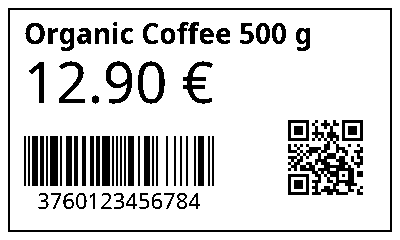
On a 50 × 30 mm label it prints this, drawn by the app’s own preview:
2Check the size
The size, { width: 50, height: 30 } above, is optional: without it, the label takes the size set for that printer in the Taprel app. With no size anywhere you get LABEL_SIZE_MISSING. A size other than the printer’s gives the warning SIZE_DIFFERS_FROM_PRINTER, because the wrong roll is probably loaded.
3Preview it
A label’s preview is exactly what prints, so you can save paper while you adjust positions:
const { png } = await printer.previewDocument(doc, { printerKind: "label" });

image.src = `data:image/png;base64,${png}`;
4Print it
await printer.printDocument(doc);
It goes to the printer set as Label in the Taprel app. In React and Vue, pass it to print from usePrint().
Elements
| Element | Fields | Notes |
|---|---|---|
text |
x, y, width, height (a capital letter’s height, default 3), bold, align (start, center or end), rotate |
Wraps inside width, which reaches the label’s edge by default. Text past the edge is cut off, with the warning TEXT_CUT_OFF |
barcode |
format (required), x, y, width, height (default 10, digits included), showText, rotate |
code128, code39, ean13, ean8, upca or itf. Bars snap to whole printer dots so they scan, so a barcode can be narrower than width, starting at x |
qr |
x, y, size (default 15) |
|
image |
x, y, width, height |
|
box |
x, y, width, height, thickness (default 0.3) |
|
line |
x, y, width, height (default 0.3) |
A filled bar, written line: true |
Good to know
- Rotate is 0, 90, 180 or 270.
- Outside the label: an element placed outside it gives
BAD_REQUEST. - White space: leave some around barcodes and QR codes, so they scan.
- EAN-13 takes its 12 digits, and the app adds the check digit, or all 13 with the right check digit. A wrong one gives
BAD_REQUEST:content[0].barcode: not valid for ean13: Invalid checksum.