Receipts
Write a receipt as a plain list, for 58 and 80 mm rolls.
A receipt flows from top to bottom. Its width comes from the printer’s paper setting, so one document fits 58 and 80 mm rolls, and it’s as long as its content.
1Write it
import { receipt } from "@taprel/sdk";

const doc = receipt([
  { image: logo, width: 22, align: "center" },
  { text: "Café Central", align: "center", bold: true, size: 2 },
  { text: "12 rue de la Paix, Paris", align: "center" },
  { space: 1 },
  { row: ["Order 1042", "Table 7"] },
  { row: ["7 Nov 2026", "12:41"] },
  { line: "dashed" },
  { row: ["2 x Cappuccino", "7.00"] },
  { row: ["1 x Croissant", "2.50"] },
  { row: ["1 x Orange juice", "4.50"] },
  { line: "dashed" },
  { row: ["Subtotal", "14.00"] },
  { row: ["Tax 10%", "1.40"] },
  { row: ["Total", "15.40"], bold: true, size: 2 },
  { row: ["Card **** 4242", "15.40"] },
  { line: true },
  { text: "Thank you, see you soon!", align: "center" },
  { space: 1 },
  { qr: "https://cafe.example/order/1042", size: 22, align: "center" },
  { barcode: "1042", format: "code128", height: 10, showText: true, align: "center" },
  { cut: true },
  { drawer: true }, // opens the cash drawer plugged into the printer
]);
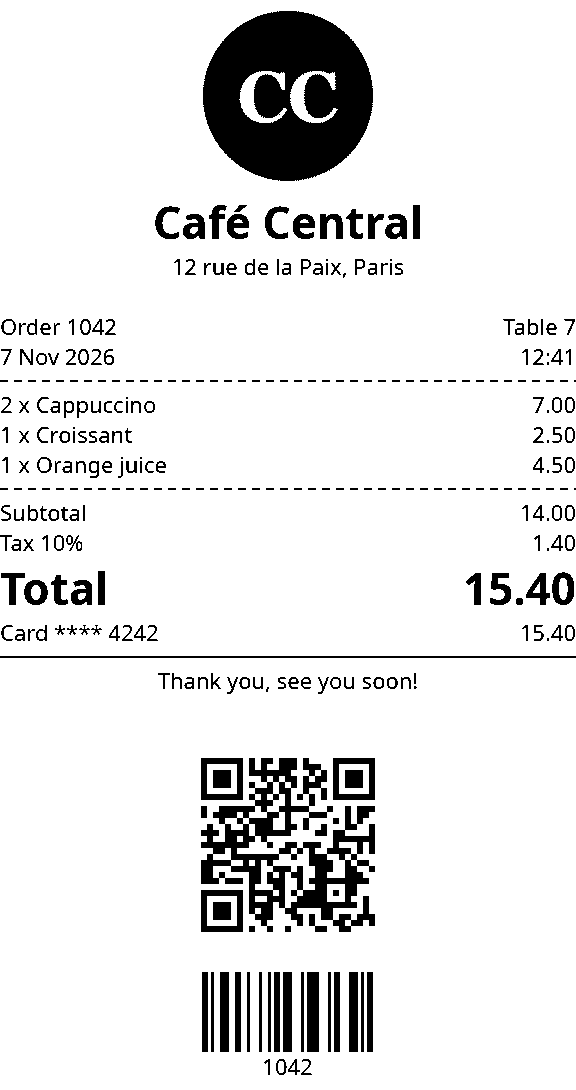
logo is your logo’s picture, see Images. On an 80 mm roll it prints this, drawn by the app’s own preview:
2Fill it from your data
A document is a plain list, so your own code builds it. false, null, undefined, 0 and "" are left out, which makes optional lines easy:
const doc = receipt([
  ...order.items.map((item) => ({ row: [`${item.qty} x ${item.name}`, item.price.toFixed(2)] })),
  order.discount && { row: ["Discount", order.discount.toFixed(2)] },
  { row: ["Total", order.total.toFixed(2)], bold: true },
  { cut: true },
]);
3Print it
await printer.printDocument(doc);
It goes to the printer set as Receipt in the Taprel app. In React and Vue, pass it to print from usePrint(), as in the Quick start.
Elements
| Element | Fields | Notes |
|---|---|---|
text |
align, bold, underline, size (1 to 3) |
Long text wraps between words |
row |
list of texts, widths, aligns, bold, size |
The first column takes the free space, and the last is aligned to the end. Long text wraps inside its column |
line |
true, "dashed" or "double" |
Full width |
space |
number of empty lines | |
image |
width (mm), align |
Turned black and white |
qr |
size (mm), align |
|
barcode |
format (required), height (mm), showText, align |
code128, code39, ean13, ean8, upca or itf. ean13 takes 12 digits, or 13 with the right check digit |
cut |
true |
Feeds the paper first, so the cut never goes through the content |
drawer |
true |
Opens the cash drawer plugged into the printer |
Images
image takes a Blob, a File, bytes, or base64 text, in PNG or JPEG. The app never downloads pictures, so for a logo at an address, fetch it first: await (await fetch(url)).blob(). Use base64 text to save a document as JSON.
Good to know
- Align:
start,centerorend.startis the left for French and the right for Arabic, found from the text. - Sizes: text
sizeis 1, 2 or 3. Everything else, like a QR code’ssize, is in mm. - Money: rows take text, not numbers, so a price prints exactly as you wrote it, like
"6.50". - Line length: on an ESC/POS printer, text in plain English letters prints in the printer’s own font: 48 characters a line on 80 mm paper and 32 on 58 mm, half that at size 2 and a third at size 3. Text with accents or symbols, like
éor€, is drawn as a picture, so it always prints right. - Previews match the paper, except plain English text on ESC/POS: it prints in the printer’s own font, so it looks a little different and can wrap differently.
- Three columns:
{ row: ["2", "Cappuccino", "7.00"], widths: [1, 4, 2] }gives each column its share of the width. - Elements in a variable need a type, or TypeScript reads
"center"as any string:const title: ReceiptText = { text: "Hi", align: "center" }, withimport type { ReceiptText } from "@taprel/sdk". - Mistakes fail early: an unknown field or a wrong value gives
BAD_REQUESTwith its place, likecontent[3].align: must be start, center or end.